
 S Windows verze 10 přinesl Microsoft každému uživateli do té doby nevídanou možnost zkoušet vývojové verze operačního systému ještě před jejich uvedením ve stabilním stavu. V momentálně posledním sestavení 14316 jsme se dočkali ještě před několika lety takřka nemožného. Tím je integrace GNU/Linux přímo v operačním systému. Tato podpora nicméně není zapnuta automaticky, ale je nutné ji aktivovat jako vlastnost systému. Na tomto duálním ekosystému spolupracuje Microsoft s vydavatelem nejrozšířenější linuxové distribuce Ubuntu, společností Canonical.
O tom, co nám může přítomnost Ubuntu ve Windows 10 nabídnout lze vést rozsáhlé debaty. Můžeme si ale vzít za příklad projekt Wine, díky kterému lze spouštět aplikace Windows v prostředí linuxu a jiných operačních systémech. Architektura Wine je ale rozdílná.
Stav integrace
Momentálně je k dispozici Ubuntu 14.04.4 LTS (jessie/sid). Prvotní instalace zabírá cca 530 MB diskového prostoru a je k dispozici pouze pro uživatele, který tuto instalaci provedl. Tzn. každý uživatel, který instalaci provádí, má vlastní oddělený systém od ostatních, tedy vlastní linuxový obraz.
Do systému se nikterak nepřihlašuje, přístup je možný spuštěním příkazu bash. Ve výchozím stavu pracuje uživatel pod unixovým uživatelským účtem root. Díky tomu, a dalším nuancím, lze odvodit, že je Ubuntu pod Windows je určeno zejména pro vývoj linuxových aplikací a spouštění binárních souborů.

Pokud nás zajímá jedna z nejdůležitějších součástí systému, linuxové jádro, dostaneme se k verzi 3.4.0:
root@localhost:/# cat /proc/version
Linux version 3.4.0-Microsoft (Microsoft@Microsoft.com) (gcc version 4.7 (GCC) ) #1 SMP PREEMPT Wed Dec 31 14:42:53 PST 2014

root@localhost:/# uname -a
Linux localhost 3.4.0+ #1 PREEMPT Thu Aug 1 17:06:05 CST 2013 x86_64 x86_64 x86_64 GNU/Linux
Jak výše uvedený výstup ukazuje, můžeme spouštět binární soubory přeložené pro architekturu x86_64.
K dispozici je na mém systému 1 GB RAM (pravděpodobně bude možné tuto velikost nastavit – OS Windows může alokovat až cca 8 GB):
root@localhost:/# free -h
             total       used       free     shared    buffers     cached
Mem:          1.0G       342M       664M         0B         0B         0B
-/+ buffers/cache:       342M       664M
Swap:           0B         0B         0B
Na systém, kde běží pouze init a bash, je spotřeba paměti (342 MB) docela velká.
O obecném stavu se můžeme přesvědčit výpisem z několika souborových systémů:
root@localhost:~# ls -lR /proc/
/proc/:
total 0
dr-xr-xr-x 1 root root 0 Apr 19 09:19 1
dr-xr-xr-x 1 root root 0 Apr 19 09:19 2
dr-xr-xr-x 1 root root 0 Apr 19 09:22 20
-r--r--r-- 1 root root 0 Apr 19 09:18 cmdline
-r--r--r-- 1 root root 0 Apr 19 09:18 cpuinfo
-r--r--r-- 1 root root 0 Apr 19 09:18 filesystems
-r--r--r-- 1 root root 0 Apr 19 09:18 interrupts
-r--r--r-- 1 root root 0 Apr 19 09:18 meminfo
lrwxrwxrwx 1 root root 0 Apr 19 09:18 mounts -> self/mounts
lrwxrwxrwx 1 root root 0 Apr 19 09:18 net -> /proc/self/net
lrwxrwxrwx 1 root root 0 Apr 19 09:18 self -> /proc/20
-r--r--r-- 1 root root 0 Apr 19 09:18 stat
dr-xr-xr-x 1 root root 0 Apr 19 09:18 sys
-r--r--r-- 1 root root 0 Apr 19 09:18 uptime
-r--r--r-- 1 root root 0 Apr 19 09:18 version

/proc/1:
total 0
dr-x------ 1 root root 0 Apr 19 09:19 attr
-r-------- 1 root root 0 Apr 19 09:19 auxv
-r--r--r-- 1 root root 0 Apr 19 09:19 cmdline
-rw-r--r-- 1 root root 0 Apr 19 09:19 comm
lrwxrwxrwx 1 root root 0 Apr 19 09:19 cwd -> /
lrwxrwxrwx 1 root root 0 Apr 19 09:19 exe -> /init
dr-x------ 1 root root 0 Apr 19 09:19 fd
-r--r--r-- 1 root root 0 Apr 19 09:19 limits
-r--r--r-- 1 root root 0 Apr 19 09:19 maps
-r--r--r-- 1 root root 0 Apr 19 09:19 mounts
dr-xr-xr-x 1 root root 0 Apr 19 09:19 net
-rw-r--r-- 1 root root 0 Apr 19 09:19 oom_adj
-r--r--r-- 1 root root 0 Apr 19 09:19 schedstat
-r--r--r-- 1 root root 0 Apr 19 09:19 smaps
-r--r--r-- 1 root root 0 Apr 19 09:19 stat
-r--r--r-- 1 root root 0 Apr 19 09:19 status
dr-xr-xr-x 1 root root 0 Apr 19 09:19 task

/proc/1/attr:
total 0
-r--r--r-- 1 root root 0 Apr 19 09:22 current

/proc/1/fd:
total 0
lrwx------ 1 root root 0 Apr 19 09:22 0 -> /unknown
lrwx------ 1 root root 0 Apr 19 09:22 1 -> /unknown
lrwx------ 1 root root 0 Apr 19 09:22 2 -> /unknown
l-wx------ 1 root root 0 Apr 19 09:22 3 -> /unknown
lrwx------ 1 root root 0 Apr 19 09:22 4 -> /unknown
lrwx------ 1 root root 0 Apr 19 09:22 5 -> /unknown

/proc/1/net:
total 0
-r--r--r-- 1 root root 0 Apr 19 09:22 if_inet6
-r--r--r-- 1 root root 0 Apr 19 09:22 netlink
-r--r--r-- 1 root root 0 Apr 19 09:22 tcp
-r--r--r-- 1 root root 0 Apr 19 09:22 tcp6
-r--r--r-- 1 root root 0 Apr 19 09:22 udp
-r--r--r-- 1 root root 0 Apr 19 09:22 udp6
dr-xr-xr-x 1 root root 0 Apr 19 09:22 xt_qtaguid

/proc/1/net/xt_qtaguid:
total 0
--w--w--w- 1 root root 0 Apr 19 09:22 ctrl
-r--r--r-- 1 root root 0 Apr 19 09:22 iface_stat_all
-r--r--r-- 1 root root 0 Apr 19 09:22 iface_stat_fmt
-r--r--r-- 1 root root 0 Apr 19 09:22 stats

/proc/1/task:
total 0
dr-xr-xr-x 1 root root 0 Apr 19 09:22 1

/proc/1/task/1:
total 0
dr-x------ 1 root root 0 Apr 19 09:22 attr
-r-------- 1 root root 0 Apr 19 09:22 auxv
-r--r--r-- 1 root root 0 Apr 19 09:22 cmdline
-rw-r--r-- 1 root root 0 Apr 19 09:22 comm
lrwxrwxrwx 1 root root 0 Apr 19 09:22 cwd -> /
lrwxrwxrwx 1 root root 0 Apr 19 09:22 exe -> /init
dr-x------ 1 root root 0 Apr 19 09:22 fd
-r--r--r-- 1 root root 0 Apr 19 09:22 limits
-r--r--r-- 1 root root 0 Apr 19 09:22 maps
-r--r--r-- 1 root root 0 Apr 19 09:22 mounts
-rw-r--r-- 1 root root 0 Apr 19 09:22 oom_adj
-r--r--r-- 1 root root 0 Apr 19 09:22 schedstat
-r--r--r-- 1 root root 0 Apr 19 09:22 smaps
-r--r--r-- 1 root root 0 Apr 19 09:22 stat
-r--r--r-- 1 root root 0 Apr 19 09:22 status

/proc/1/task/1/attr:
total 0
-r--r--r-- 1 root root 0 Apr 19 09:22 current

/proc/1/task/1/fd:
total 0
lrwx------ 1 root root 0 Apr 19 09:22 0 -> /unknown
lrwx------ 1 root root 0 Apr 19 09:22 1 -> /unknown
lrwx------ 1 root root 0 Apr 19 09:22 2 -> /unknown
l-wx------ 1 root root 0 Apr 19 09:22 3 -> /unknown
lrwx------ 1 root root 0 Apr 19 09:22 4 -> /unknown
lrwx------ 1 root root 0 Apr 19 09:22 5 -> /unknown

/proc/2:
total 0
dr-x------ 1 root root 0 Apr 19 09:19 attr
-r-------- 1 root root 0 Apr 19 09:19 auxv
-r--r--r-- 1 root root 0 Apr 19 09:19 cmdline
-rw-r--r-- 1 root root 0 Apr 19 09:19 comm
lrwxrwxrwx 1 root root 0 Apr 19 09:19 cwd -> /root
lrwxrwxrwx 1 root root 0 Apr 19 09:19 exe -> /bin/bash
dr-x------ 1 root root 0 Apr 19 09:19 fd
-r--r--r-- 1 root root 0 Apr 19 09:19 limits
-r--r--r-- 1 root root 0 Apr 19 09:19 maps
-r--r--r-- 1 root root 0 Apr 19 09:19 mounts
dr-xr-xr-x 1 root root 0 Apr 19 09:19 net
-rw-r--r-- 1 root root 0 Apr 19 09:19 oom_adj
-r--r--r-- 1 root root 0 Apr 19 09:19 schedstat
-r--r--r-- 1 root root 0 Apr 19 09:19 smaps
-r--r--r-- 1 root root 0 Apr 19 09:19 stat
-r--r--r-- 1 root root 0 Apr 19 09:19 status
dr-xr-xr-x 1 root root 0 Apr 19 09:19 task

/proc/2/attr:
total 0
-r--r--r-- 1 root root 0 Apr 19 09:22 current

/proc/2/fd:
total 0
lrwx------ 1 root root 0 Apr 19 09:22 0 -> /WINDOWS/console
lrwx------ 1 root root 0 Apr 19 09:22 1 -> /WINDOWS/console
lrwx------ 1 root root 0 Apr 19 09:22 2 -> /WINDOWS/console
lrwx------ 1 root root 0 Apr 19 09:22 255 -> /WINDOWS/console

/proc/2/net:
total 0
-r--r--r-- 1 root root 0 Apr 19 09:22 if_inet6
-r--r--r-- 1 root root 0 Apr 19 09:22 netlink
-r--r--r-- 1 root root 0 Apr 19 09:22 tcp
-r--r--r-- 1 root root 0 Apr 19 09:22 tcp6
-r--r--r-- 1 root root 0 Apr 19 09:22 udp
-r--r--r-- 1 root root 0 Apr 19 09:22 udp6
dr-xr-xr-x 1 root root 0 Apr 19 09:22 xt_qtaguid

/proc/2/net/xt_qtaguid:
total 0
--w--w--w- 1 root root 0 Apr 19 09:22 ctrl
-r--r--r-- 1 root root 0 Apr 19 09:22 iface_stat_all
-r--r--r-- 1 root root 0 Apr 19 09:22 iface_stat_fmt
-r--r--r-- 1 root root 0 Apr 19 09:22 stats

/proc/2/task:
total 0
dr-xr-xr-x 1 root root 0 Apr 19 09:22 2

/proc/2/task/2:
total 0
dr-x------ 1 root root 0 Apr 19 09:22 attr
-r-------- 1 root root 0 Apr 19 09:22 auxv
-r--r--r-- 1 root root 0 Apr 19 09:22 cmdline
-rw-r--r-- 1 root root 0 Apr 19 09:22 comm
lrwxrwxrwx 1 root root 0 Apr 19 09:22 cwd -> /root
lrwxrwxrwx 1 root root 0 Apr 19 09:22 exe -> /bin/bash
dr-x------ 1 root root 0 Apr 19 09:22 fd
-r--r--r-- 1 root root 0 Apr 19 09:22 limits
-r--r--r-- 1 root root 0 Apr 19 09:22 maps
-r--r--r-- 1 root root 0 Apr 19 09:22 mounts
-rw-r--r-- 1 root root 0 Apr 19 09:22 oom_adj
-r--r--r-- 1 root root 0 Apr 19 09:22 schedstat
-r--r--r-- 1 root root 0 Apr 19 09:22 smaps
-r--r--r-- 1 root root 0 Apr 19 09:22 stat
-r--r--r-- 1 root root 0 Apr 19 09:22 status

/proc/2/task/2/attr:
total 0
-r--r--r-- 1 root root 0 Apr 19 09:22 current

/proc/2/task/2/fd:
total 0
lrwx------ 1 root root 0 Apr 19 09:22 0 -> /WINDOWS/console
lrwx------ 1 root root 0 Apr 19 09:22 1 -> /WINDOWS/console
lrwx------ 1 root root 0 Apr 19 09:22 2 -> /WINDOWS/console
lrwx------ 1 root root 0 Apr 19 09:22 255 -> /WINDOWS/console

/proc/20:
total 0
dr-x------ 1 root root 0 Apr 19 09:22 attr
-r-------- 1 root root 0 Apr 19 09:22 auxv
-r--r--r-- 1 root root 0 Apr 19 09:22 cmdline
-rw-r--r-- 1 root root 0 Apr 19 09:22 comm
lrwxrwxrwx 1 root root 0 Apr 19 09:22 cwd -> /root
lrwxrwxrwx 1 root root 0 Apr 19 09:22 exe -> /bin/ls
dr-x------ 1 root root 0 Apr 19 09:22 fd
-r--r--r-- 1 root root 0 Apr 19 09:22 limits
-r--r--r-- 1 root root 0 Apr 19 09:22 maps
-r--r--r-- 1 root root 0 Apr 19 09:22 mounts
dr-xr-xr-x 1 root root 0 Apr 19 09:22 net
-rw-r--r-- 1 root root 0 Apr 19 09:22 oom_adj
-r--r--r-- 1 root root 0 Apr 19 09:22 schedstat
-r--r--r-- 1 root root 0 Apr 19 09:22 smaps
-r--r--r-- 1 root root 0 Apr 19 09:22 stat
-r--r--r-- 1 root root 0 Apr 19 09:22 status
dr-xr-xr-x 1 root root 0 Apr 19 09:22 task

/proc/20/attr:
total 0
-r--r--r-- 1 root root 0 Apr 19 09:22 current

/proc/20/fd:
total 0
lrwx------ 1 root root 0 Apr 19 09:22 0 -> /WINDOWS/console
lrwx------ 1 root root 0 Apr 19 09:22 1 -> /WINDOWS/console
lrwx------ 1 root root 0 Apr 19 09:22 2 -> /WINDOWS/console
lr-x------ 1 root root 0 Apr 19 09:22 3 -> /proc/20/fd

/proc/20/net:
total 0
-r--r--r-- 1 root root 0 Apr 19 09:22 if_inet6
-r--r--r-- 1 root root 0 Apr 19 09:22 netlink
-r--r--r-- 1 root root 0 Apr 19 09:22 tcp
-r--r--r-- 1 root root 0 Apr 19 09:22 tcp6
-r--r--r-- 1 root root 0 Apr 19 09:22 udp
-r--r--r-- 1 root root 0 Apr 19 09:22 udp6
dr-xr-xr-x 1 root root 0 Apr 19 09:22 xt_qtaguid

/proc/20/net/xt_qtaguid:
total 0
--w--w--w- 1 root root 0 Apr 19 09:22 ctrl
-r--r--r-- 1 root root 0 Apr 19 09:22 iface_stat_all
-r--r--r-- 1 root root 0 Apr 19 09:22 iface_stat_fmt
-r--r--r-- 1 root root 0 Apr 19 09:22 stats

/proc/20/task:
total 0
dr-xr-xr-x 1 root root 0 Apr 19 09:22 20

/proc/20/task/20:
total 0
dr-x------ 1 root root 0 Apr 19 09:22 attr
-r-------- 1 root root 0 Apr 19 09:22 auxv
-r--r--r-- 1 root root 0 Apr 19 09:22 cmdline
-rw-r--r-- 1 root root 0 Apr 19 09:22 comm
lrwxrwxrwx 1 root root 0 Apr 19 09:22 cwd -> /root
lrwxrwxrwx 1 root root 0 Apr 19 09:22 exe -> /bin/ls
dr-x------ 1 root root 0 Apr 19 09:22 fd
-r--r--r-- 1 root root 0 Apr 19 09:22 limits
-r--r--r-- 1 root root 0 Apr 19 09:22 maps
-r--r--r-- 1 root root 0 Apr 19 09:22 mounts
-rw-r--r-- 1 root root 0 Apr 19 09:22 oom_adj
-r--r--r-- 1 root root 0 Apr 19 09:22 schedstat
-r--r--r-- 1 root root 0 Apr 19 09:22 smaps
-r--r--r-- 1 root root 0 Apr 19 09:22 stat
-r--r--r-- 1 root root 0 Apr 19 09:22 status

/proc/20/task/20/attr:
total 0
-r--r--r-- 1 root root 0 Apr 19 09:22 current

/proc/20/task/20/fd:
total 0
lrwx------ 1 root root 0 Apr 19 09:22 0 -> /WINDOWS/console
lrwx------ 1 root root 0 Apr 19 09:22 1 -> /WINDOWS/console
lrwx------ 1 root root 0 Apr 19 09:22 2 -> /WINDOWS/console
lr-x------ 1 root root 0 Apr 19 09:22 3 -> /proc/20/task/20/fd

/proc/sys:
total 0
dr-xr-xr-x 1 root root 0 Apr 19 09:19 kernel

/proc/sys/kernel:
total 0
-r--r--r-- 1 root root 0 Apr 19 09:19 ngroups_max
-r--r--r-- 1 root root 0 Apr 19 09:19 osrelease
-r--r--r-- 1 root root 0 Apr 19 09:19 ostype
-rw-r--r-- 1 root root 0 Apr 19 09:19 pid_max
root@localhost:~# ls -lR /dev
/dev:
ls: cannot access /dev/tty0: Invalid argument
ls: cannot access /dev/adss: Operation not permitted
total 3
?????????? ? ?    ?       ?            ? adss
drwxr-xr-x 2 root root    0 Apr 19 09:24 block
-rwxr--r-- 2 1000 1003    0 Apr 19 09:24 fb0
drwxr-xr-x 2 root root    0 Apr 19 09:24 input
crw------- 1 root 1007 0, 0 Apr 19 09:24 kmsg
?--------- 0 root root    0 Jan  1  1970 null
crw-rw-rw- 1 root tty  5, 2 Apr 19 09:24 ptmx
drwxr-xr-x 2 root root    0 Apr 19 09:24 pts
crw-rw-rw- 1 root root 1, 8 Apr 19 09:24 random
lrwxrwxrwx 2 root root    0 Apr 19 09:24 shm -> /run/shm
crw--w---- 1 1000 tty  5, 0 Apr 19 09:24 tty
?????????? ? ?    ?       ?            ? tty0
crw-rw-rw- 1 root root 1, 9 Apr 19 09:24 urandom
crw-rw-rw- 1 root root 0, 0 Apr 19 09:24 zero
ls: /dev/block: not listing already-listed directory
ls: /dev/input: not listing already-listed directory
ls: /dev/pts: not listing already-listed directory
root@localhost:~# ls -lR /sys
/sys:
total 0
drwxr-xr-x 1 root root 0 Apr 19 09:19 block
drwxr-xr-x 1 root root 0 Apr 19 09:19 bus
drwxr-xr-x 1 root root 0 Apr 19 09:19 class
drwxr-xr-x 1 root root 0 Apr 19 09:19 dev
drwxr-xr-x 1 root root 0 Apr 19 09:19 devices
drwxr-xr-x 1 root root 0 Apr 19 09:19 firmware
drwxr-xr-x 1 root root 0 Apr 19 09:19 fs
drwxr-xr-x 1 root root 0 Apr 19 09:19 kernel
drwxr-xr-x 1 root root 0 Apr 19 09:19 module
drwxr-xr-x 1 root root 0 Apr 19 09:19 power

/sys/block:
total 0

/sys/bus:
total 0

/sys/class:
total 0
drwxr-xr-x 1 root root 0 Apr 19 09:26 backlight
drwxr-xr-x 1 root root 0 Apr 19 09:26 net
drwxr-xr-x 1 root root 0 Apr 19 09:26 power_supply
drwxr-xr-x 1 root root 0 Apr 19 09:26 switch
drwxr-xr-x 1 root root 0 Apr 19 09:26 timed_output

/sys/class/backlight:
total 0

/sys/class/net:
total 0
lrwxrwxrwx 1 root root 0 Apr 19 09:26 eth0 -> ../../devices/virtual/net/eth0
lrwxrwxrwx 1 root root 0 Apr 19 09:26 eth1 -> ../../devices/virtual/net/eth1
lrwxrwxrwx 1 root root 0 Apr 19 09:26 lo -> ../../devices/virtual/net/lo
lrwxrwxrwx 1 root root 0 Apr 19 09:26 und0 -> ../../devices/virtual/net/und0
lrwxrwxrwx 1 root root 0 Apr 19 09:26 und1 -> ../../devices/virtual/net/und1
lrwxrwxrwx 1 root root 0 Apr 19 09:26 wifi0 -> ../../devices/virtual/net/wifi0
lrwxrwxrwx 1 root root 0 Apr 19 09:26 wifi1 -> ../../devices/virtual/net/wifi1

/sys/class/power_supply:
total 0
drwxr-xr-x 1 root root 0 Apr 19 09:26 ac
drwxr-xr-x 1 root root 0 Apr 19 09:26 battery
drwxr-xr-x 1 root root 0 Apr 19 09:26 usb

/sys/class/power_supply/ac:
total 0
-r--r--r-- 1 root root 0 Apr 19 09:26 online
-r--r--r-- 1 root root 0 Apr 19 09:26 type

/sys/class/power_supply/battery:
total 0
-r--r--r-- 1 root root 0 Apr 19 09:26 capacity
-r--r--r-- 1 root root 0 Apr 19 09:26 charge_counter
-r--r--r-- 1 root root 0 Apr 19 09:26 current_now
-r--r--r-- 1 root root 0 Apr 19 09:26 health
-r--r--r-- 1 root root 0 Apr 19 09:26 present
-r--r--r-- 1 root root 0 Apr 19 09:26 status
-r--r--r-- 1 root root 0 Apr 19 09:26 technology
-r--r--r-- 1 root root 0 Apr 19 09:26 temp
-r--r--r-- 1 root root 0 Apr 19 09:26 type
-r--r--r-- 1 root root 0 Apr 19 09:26 voltage_now

/sys/class/power_supply/usb:
total 0
-r--r--r-- 1 root root 0 Apr 19 09:26 online
-r--r--r-- 1 root root 0 Apr 19 09:26 type

/sys/class/switch:
total 0

/sys/class/timed_output:
total 0

/sys/dev:
total 0

/sys/devices:
total 0
drwxr-xr-x 1 root root 0 Apr 19 09:19 system
drwxr-xr-x 1 root root 0 Apr 19 09:19 virtual

/sys/devices/system:
total 0
drwxr-xr-x 1 root root 0 Apr 19 09:19 cpu

/sys/devices/system/cpu:
total 0
drwxr-xr-x 1 root root 0 Apr 19 09:19 cpu0
drwxr-xr-x 1 root root 0 Apr 19 09:19 cpu1
drwxr-xr-x 1 root root 0 Apr 19 09:19 cpu2
drwxr-xr-x 1 root root 0 Apr 19 09:19 cpu3
-r--r--r-- 1 root root 0 Apr 19 09:19 online
-r--r--r-- 1 root root 0 Apr 19 09:19 possible
-r--r--r-- 1 root root 0 Apr 19 09:19 present

/sys/devices/system/cpu/cpu0:
total 0
drwxr-xr-x 1 root root 0 Apr 19 09:26 cpufreq
drwxr-xr-x 1 root root 0 Apr 19 09:26 topology

/sys/devices/system/cpu/cpu0/cpufreq:
total 0
-r--r--r-- 1 root root 0 Apr 19 09:26 cpuinfo_max_freq
-rw-rw---- 1 root root 0 Apr 19 09:26 scaling_max_freq

/sys/devices/system/cpu/cpu0/topology:
total 0
-r--r--r-- 1 root root 0 Apr 19 09:26 core_id
-r--r--r-- 1 root root 0 Apr 19 09:26 core_siblings
-r--r--r-- 1 root root 0 Apr 19 09:26 core_siblings_list
-r--r--r-- 1 root root 0 Apr 19 09:26 physical_package_id
-r--r--r-- 1 root root 0 Apr 19 09:26 thread_siblings
-r--r--r-- 1 root root 0 Apr 19 09:26 thread_siblings_list

/sys/devices/system/cpu/cpu1:
total 0
drwxr-xr-x 1 root root 0 Apr 19 09:26 cpufreq
drwxr-xr-x 1 root root 0 Apr 19 09:26 topology

/sys/devices/system/cpu/cpu1/cpufreq:
total 0
-r--r--r-- 1 root root 0 Apr 19 09:26 cpuinfo_max_freq
-rw-rw---- 1 root root 0 Apr 19 09:26 scaling_max_freq

/sys/devices/system/cpu/cpu1/topology:
total 0
-r--r--r-- 1 root root 0 Apr 19 09:26 core_id
-r--r--r-- 1 root root 0 Apr 19 09:26 core_siblings
-r--r--r-- 1 root root 0 Apr 19 09:26 core_siblings_list
-r--r--r-- 1 root root 0 Apr 19 09:26 physical_package_id
-r--r--r-- 1 root root 0 Apr 19 09:26 thread_siblings
-r--r--r-- 1 root root 0 Apr 19 09:26 thread_siblings_list

/sys/devices/system/cpu/cpu2:
total 0
drwxr-xr-x 1 root root 0 Apr 19 09:26 cpufreq
drwxr-xr-x 1 root root 0 Apr 19 09:26 topology

/sys/devices/system/cpu/cpu2/cpufreq:
total 0
-r--r--r-- 1 root root 0 Apr 19 09:26 cpuinfo_max_freq
-rw-rw---- 1 root root 0 Apr 19 09:26 scaling_max_freq

/sys/devices/system/cpu/cpu2/topology:
total 0
-r--r--r-- 1 root root 0 Apr 19 09:26 core_id
-r--r--r-- 1 root root 0 Apr 19 09:26 core_siblings
-r--r--r-- 1 root root 0 Apr 19 09:26 core_siblings_list
-r--r--r-- 1 root root 0 Apr 19 09:26 physical_package_id
-r--r--r-- 1 root root 0 Apr 19 09:26 thread_siblings
-r--r--r-- 1 root root 0 Apr 19 09:26 thread_siblings_list

/sys/devices/system/cpu/cpu3:
total 0
drwxr-xr-x 1 root root 0 Apr 19 09:26 cpufreq
drwxr-xr-x 1 root root 0 Apr 19 09:26 topology

/sys/devices/system/cpu/cpu3/cpufreq:
total 0
-r--r--r-- 1 root root 0 Apr 19 09:26 cpuinfo_max_freq
-rw-rw---- 1 root root 0 Apr 19 09:26 scaling_max_freq

/sys/devices/system/cpu/cpu3/topology:
total 0
-r--r--r-- 1 root root 0 Apr 19 09:26 core_id
-r--r--r-- 1 root root 0 Apr 19 09:26 core_siblings
-r--r--r-- 1 root root 0 Apr 19 09:26 core_siblings_list
-r--r--r-- 1 root root 0 Apr 19 09:26 physical_package_id
-r--r--r-- 1 root root 0 Apr 19 09:26 thread_siblings
-r--r--r-- 1 root root 0 Apr 19 09:26 thread_siblings_list

/sys/devices/virtual:
total 0
drwxr-xr-x 1 root root 0 Apr 19 09:26 net

/sys/devices/virtual/net:
total 0
drwxr-xr-x 1 root root 0 Apr 19 09:26 eth0
drwxr-xr-x 1 root root 0 Apr 19 09:26 eth1
drwxr-xr-x 1 root root 0 Apr 19 09:26 lo
drwxr-xr-x 1 root root 0 Apr 19 09:26 und0
drwxr-xr-x 1 root root 0 Apr 19 09:26 und1
drwxr-xr-x 1 root root 0 Apr 19 09:26 wifi0
drwxr-xr-x 1 root root 0 Apr 19 09:26 wifi1

/sys/devices/virtual/net/eth0:
total 0
-r--r--r-- 1 root root 0 Apr 19 09:26 address
-r--r--r-- 1 root root 0 Apr 19 09:26 flags
-r--r--r-- 1 root root 0 Apr 19 09:26 ifindex
-r--r--r-- 1 root root 0 Apr 19 09:26 mtu

/sys/devices/virtual/net/eth1:
total 0
-r--r--r-- 1 root root 0 Apr 19 09:26 address
-r--r--r-- 1 root root 0 Apr 19 09:26 flags
-r--r--r-- 1 root root 0 Apr 19 09:26 ifindex
-r--r--r-- 1 root root 0 Apr 19 09:26 mtu

/sys/devices/virtual/net/lo:
total 0
-r--r--r-- 1 root root 0 Apr 19 09:26 address
-r--r--r-- 1 root root 0 Apr 19 09:26 flags
-r--r--r-- 1 root root 0 Apr 19 09:26 ifindex
-r--r--r-- 1 root root 0 Apr 19 09:26 mtu

/sys/devices/virtual/net/und0:
total 0
-r--r--r-- 1 root root 0 Apr 19 09:26 address
-r--r--r-- 1 root root 0 Apr 19 09:26 flags
-r--r--r-- 1 root root 0 Apr 19 09:26 ifindex
-r--r--r-- 1 root root 0 Apr 19 09:26 mtu

/sys/devices/virtual/net/und1:
total 0
-r--r--r-- 1 root root 0 Apr 19 09:26 address
-r--r--r-- 1 root root 0 Apr 19 09:26 flags
-r--r--r-- 1 root root 0 Apr 19 09:26 ifindex
-r--r--r-- 1 root root 0 Apr 19 09:26 mtu

/sys/devices/virtual/net/wifi0:
total 0
-r--r--r-- 1 root root 0 Apr 19 09:26 address
-r--r--r-- 1 root root 0 Apr 19 09:26 flags
-r--r--r-- 1 root root 0 Apr 19 09:26 ifindex
-r--r--r-- 1 root root 0 Apr 19 09:26 mtu

/sys/devices/virtual/net/wifi1:
total 0
-r--r--r-- 1 root root 0 Apr 19 09:26 address
-r--r--r-- 1 root root 0 Apr 19 09:26 flags
-r--r--r-- 1 root root 0 Apr 19 09:26 ifindex
-r--r--r-- 1 root root 0 Apr 19 09:26 mtu

/sys/firmware:
total 0

/sys/fs:
total 0

/sys/kernel:
total 0
drwx------ 1 root root 0 Apr 19 09:26 debug
drwxr-xr-x 1 root root 0 Apr 19 09:26 ipv4
drwxr-xr-x 1 root root 0 Apr 19 09:26 mm

/sys/kernel/debug:
total 0
drwxr-xr-x 1 root root 0 Apr 19 09:26 tracing
-r--r--r-- 1 root root 0 Apr 19 09:26 wakeup_sources

/sys/kernel/debug/tracing:
total 0
--w--w---- 1 root root 0 Apr 19 09:26 trace_marker

/sys/kernel/ipv4:
total 0
-rw-r--r-- 1 root root 0 Apr 19 09:26 tcp_rmem_def
-rw-r--r-- 1 root root 0 Apr 19 09:26 tcp_rmem_max
-rw-r--r-- 1 root root 0 Apr 19 09:26 tcp_rmem_min
-rw-r--r-- 1 root root 0 Apr 19 09:26 tcp_wmem_def
-rw-r--r-- 1 root root 0 Apr 19 09:26 tcp_wmem_max
-rw-r--r-- 1 root root 0 Apr 19 09:26 tcp_wmem_min

/sys/kernel/mm:
total 0

/sys/module:
total 0
drwxr-xr-x 1 root root 0 Apr 19 09:26 lowmemorykiller

/sys/module/lowmemorykiller:
total 0
drwxr-xr-x 1 root root 0 Apr 19 09:26 parameters

/sys/module/lowmemorykiller/parameters:
total 0
-rw-rw-r-- 1 root root 0 Apr 19 09:26 adj
-rw-rw-r-- 1 root root 0 Apr 19 09:26 minfree

/sys/power:
total 0
-rw-r--r-- 1 root root 0 Apr 19 09:26 autosleep
-rw-rw---- 1 root root 0 Apr 19 09:26 wake_lock
-rw-rw---- 1 root root 0 Apr 19 09:26 wake_unlock
A můžeme pokračovat dále:
root@localhost:~# ifconfig -a
Warning: cannot open /proc/net/dev (No such file or directory). Limited output.
root@localhost:~#
root@localhost:~# df -h
df: cannot read table of mounted file systems: No such file or directory
root@localhost:~#
root@localhost:~# lsmod
libkmod: ERROR ../libkmod/libkmod-module.c:1619 kmod_module_new_from_loaded: could not open /proc/modules: No such file or directory
Error: could not get list of modules: No such file or directory
root@localhost:~#
root@localhost:~# lspci
pcilib: Cannot open /proc/bus/pci
lspci: Cannot find any working access method.
root@localhost:~#
root@localhost:~# lsusb
unable to initialize libusb: -99
root@localhost:~#
root@localhost:~# cat /etc/hostname
ubuntu
root@localhost:~#
root@localhost:~# hostname
localhost
root@localhost:~#
root@localhost:~# hostnamectl
Failed to get D-Bus connection: Failed to connect to socket /var/run/dbus/system_bus_socket: No such file or directory
root@localhost:~#
root@localhost:~# hostname ubuntu
hostname: name too long
Problémy integrace
Pokud uvážíme, že se jedná první veřejný preview, je integrace dotažena přibližně do půlky. Nástrojem apt je možné provádět instalační úkony, ale celková použitelnost je značně omezena. Co bychom ale čekali, přihlásili jsme se do „demo“ programu a máme k dispozici prvotní nástřely, které často částečně nebo zcela nefungují.
Momentálně není dotažena ani základní práce na textové konzole. Pokud nainstalujeme například Midnight Commander, není ve výchozím stavu možné pohybovat kurzorem. To je dáno pravděpodobně technikou, jakou Windows pracuje s textovým režimem. Od Windows 7/8 bylo v tomto směru provedeno mnoho změn (zejména změna velikosti okna tažením za okraj), ale několik kroků k dokonalosti stále chybí.
Pokud nás zajímají otázky ohledně přístupu k datové síti, nějaké možnosti zde jsou a např. nástroj apt dokáže z internetu stahovat a následně instalovat softwarové balíčky, ale pomocí standardních nástrojů jako ip nebo ifconfig nejsme schopni se sítí zobrazit stav či jinak pracovat.
root@localhost:~# ip link list
Cannot open netlink socket: Invalid argument
root@localhost:~#
root@localhost:~# ifconfig -a
Warning: cannot open /proc/net/dev (No such file or directory). Limited output.
Podobný stav jako síťová zařízení nalezneme u připojených souborových systémů:
root@localhost:~# df -h
df: cannot read table of mounted file systems: No such file or directory
root@localhost:~#
root@localhost:~# mount
rootfs on / type rootfs (ro,relatime)
tmpfs on /dev type tmpfs (rw,seclabel,nosuid,relatime,mode=755)
devpts on /dev/pts type devpts (rw,seclabel,relatime,mode=600)
proc on /proc type proc (rw,relatime)
sysfs on /sys type sysfs (rw,seclabel,relatime)
root@localhost:~#
root@localhost:~# mount -o remount,rw /
root@localhost:~#
root@localhost:~# mount
root@localhost:~#
Copak se to stalo při přemountování rootu z ro na rw?
Instalace
Pokud nás výše zmíněné neodradilo, můžeme provést vlastní instalaci Ubuntu. Postup je velice triviální. Prvotním předpokladem je instalace Windows 10 x64, sestavení 14316. To je k dispozici pouze v programu Windows 10 Insider Preview. Po nezbytné proceduře přihlášení k programu, ve Windows povolíme stahování sestavení Insider Preview.
Windows Settings -> Aktualizace a zabezpečení -> Windows Update -> Upřesnit možnosti
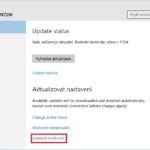

Po vyhledání aktualizací by se měla zobrazit právě verze 10 Insider Preview. Její velikost pro stažení je cca 3 – 4 GB a jedná se o kompletní instalační obraz Windows 10. Časový interval, kdy se nám tato verze mezi aktualizacemi po připojení do programu Insider Preview objeví, může trvat až několik hodin.
Dalším krokem je povolení přístupu k vývojářským funkcím:
Windows Settings -> Aktualizace a zabezpečení -> Pro vývojáře

Následně zapneme funkci Windows Subsystem for Linux (Beta)
Ovládací panely -> Programy -> Zapnout nebo vypnout funkce systému Windows

Po restartu se ve Start menu zobrazí nový zástupce Bash on Ubuntu on Windows. Po jeho spuštění můžeme přejít k automatickému stažení a instalaci základu Ubuntu do prostředí WIndows.
Aplikační adresář s nainstalovaným Ubuntu nalezneme v cestě %USERPROFILE%\AppData\Local\lxss.
Instalaci a odinstaci Ubuntu můžeme provádět také z příkazové řádky pomocí nástroje lxrun:
C:\Users\user>lxrun
Performs administrative operations on the LX subsystem

Usage:
    /install - Installs the subsystem
        Optional arguments:
            /y - Do not prompt user to accept
    /uninstall - Uninstalls the subsystem
        Optional arguments:
            /full - Perform a full uninstall
            /y - Do not prompt user to accept
    /update - Updates the subsystem
        Optional arguments:
            /critical - Perform critical update. This option will close all running LX processes when the update completes.
Logické otázky
Při bližším zkoumání Ubuntu na Windows 10 mě napadají rozličné otázky, na jejichž zodpovězení bude nutné nějaký čas počkat.
- Zůstane podpora Ubuntu ve Windows nebo dojde k odstranění?
- Bude systém automaticky upgradován aktualizačním systémem Windows nebo bude nutné tuto operaci provádět ručně?
- Bude Ubuntu provázanější s Windows?
- Stane se konzolový režim použitelnějším?
- Můžeme se těšit na provázání v v případě grafického rozhraní?
- Dojde k bližší integraci Ubuntu a Windows na úrovni hardwarové abstraktní vrstvy a hardware obecně?
- Bude přidána kompletní podpora systemd?
Závěr
Momentální stav integrace Ubuntu do Windows, je spíše ukázkou toho, že to Microsoft myslí vážně a určitou část této strastiplné cesty má za sebou. Uvidíme v několika dalších sestaveních, zda dojde k odstranění stávajících problémů a Ubuntu se stane použitelnějším. V současné době je rozhodně lepší volbou instalace linuxu ve virtuálním prostředí, např. Hyper-V.
Neházejme ale flintu do žita, mě se tento nápad líbí a jsem jeho fanouškem…